Improving conversion rates (the percentage of visitors who take a desired action) is both an art and a science.
Below is a comprehensive list of 95 actionable ways - drawn from real A/B tests, case studies, and proven principles - to boost conversions on your website or app.
These tactics span design, copy, trust-building, pricing, user experience, and more. Each tip is concise and backed by results to inspire your own optimization experiments.
Design and User Experience (UX) Improvements
#1. Increase font size for key text: Make important text (like calls-to-action or pricing) larger for better readability. In one case, HubSpot enlarged the font of their call-to-action buttons and saw a 21% increase in conversion rate.
Similarly, Crazy Egg boosted conversions by 30% by upsizing the font in their pricing table . Bigger text can draw attention to your value proposition.
2. Use high-contrast colors for CTAs: Ensure your call-to-action (CTA) buttons stand out.
A/B tests show that buttons with a color contrasting the background yield more clicks - one study noted a 35%+ sales increase when the CTA color popped from the page.
The key is visibility: your CTA should be the most eye-catching element on the screen.
3. Test different button colors: There isn't one "magic" color, but testing can find what works for you. A famous example is when HubSpot tested a red CTA button vs. a green button - the red button got 21% more clicks (even on a green-themed page).
The red stood out more, illustrating that contrast and context matter more than any inherent "best" color.
4. Position CTAs prominently (above the fold): Don't hide your CTA - place it where users see it without scrolling.
When Nature Air moved their CTA button into a more prominent, front-and-center position, conversions jumped from 2.78% to 18.95% (a 591% increase!).
Users can't convert if they don't spot your CTA, so make it obvious.
5. Embrace clean, simple layouts: Sometimes a complete redesign can pay off. 37signals (Basecamp) scrapped a busy landing page in favor of a minimalist design featuring a single strong message and image - conversions more than doubled (102% increase).
By reducing clutter and focusing on one core offer, you make it easier for visitors to absorb what you're offering and take action.
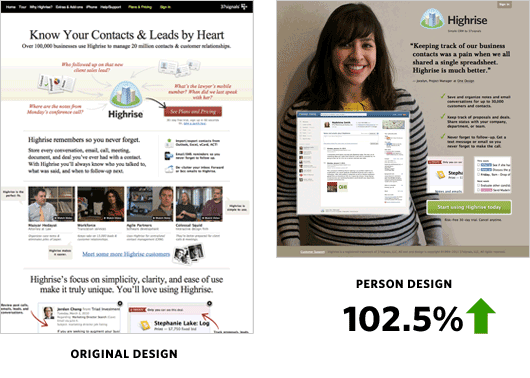
6. Add human imagery for emotional appeal: Faces can be persuasive. Highrise (a 37signals product) switched their page to include a big photo of a smiling customer and saw sign-ups increase 102.5%.
People relate to people - showing a real person (customers, team members, etc.) can build trust and connection, whereas generic stock photos do little to encourage action.
Pro tip
What works for one site might not work for another. Use these ideas as starting points, and always be ready to test and iterate.
7. Consider using video to explain value: A short, engaging video can boost understanding of your product or service. Crazy Egg added an explainer video to their homepage and increased conversions by 64%, translating to about $21,000 in extra monthly revenue.
Video works especially well for complex offerings - it conveys a lot quickly. Just be sure the video is relevant and sized appropriately (and test video vs. no video - sometimes a static image can outperform video, as seen below in tip #27).
8. Optimize your page load speed: Faster pages mean higher conversions. Walmart found that for every 1 second improvement in page load, conversions rose by 2% . Conversely, a 1-second delay can drop conversion by 7% or more.
In one experiment, adding a 2-second delay during a multi-step checkout caused a 60% drop in completions . Use techniques like image compression, caching, and minimizing scripts to speed things up - it directly impacts your bottom line.
9. Ensure your site is mobile-friendly: With mobile traffic often exceeding desktop, you must cater to small screens. Walmart Canada's responsive redesign (making the site adapt to any device) boosted overall conversions by 20%, with mobile orders increasing 98% post-redesign.
Similarly, TruckersReport realized ~50% of their visitors were on mobile and moved to a responsive layout - it ultimately helped them achieve a 79% conversion lift through their redesign and testing efforts.
Tip: test your forms and pages on a phone to identify pain points.
10. Don't fear scrolling - use the full page: Conventional wisdom says put everything "above the fold," but users will scroll if content is relevant. In a test for a financial services page, moving a sign-up form slightly below the fold (with compelling intro content at top) actually increased conversions by 52%.
The visitors who scrolled were more committed and informed by the time the form appeared. The takeaway: it's okay if your page is longer - just make sure the content above the fold is engaging enough to make people want to scroll down.
11. Test unique layouts vs. standard designs: While you want to stand out, sometimes a conventional layout works best for usability. SmartWool tried a creative, staggered product grid on their category page versus a traditional uniform grid. The traditional layout won, raising revenue per user by 17.1% . The standard design made it easier for shoppers to scan and find products. Don't assume a flashy new design will always convert better - test it against a simpler version.
12. Make your site look credible and professional: First impressions count. If your site appears outdated or amateur, visitors may hesitate. TruckersReport's original landing page was "simple, but boring" with a cheesy stock photo . Through redesign (including a more modern look and a relatable image), they improved users' first impressions and later achieved a 79% conversion boost . Clean typography, ample white space, and a cohesive color scheme help build trust, which in turn improves conversions.
13. Remove distractions that don't support the goal: Every extra button, link, or graphic on a conversion page is an opportunity for the user to wander off. Optimizely ran a test removing the top navigation menu from checkout pages - result: 14% higher revenue per visitor by keeping users focused on finishing the purchase . Similarly, removing social share buttons from product pages (which often showed zero shares) increased "Add to Cart" clicks by 11.9% . Trim the excess elements on crucial pages so the primary action stands out.
14. Provide visual cues of progress in multi-step flows: If your signup or checkout has multiple steps, show users where they are with a progress bar or step indicators. This reassurance can reduce drop-offs. (For example, an e-commerce study by Baymard Institute found that nearly 10% of users abandoned at an interstitial "progress" page that didn't clearly indicate next steps . When TruckersReport removed an unnecessary "Loading offers..." step and made their 5-step process more transparent, they saw a significant uptick in completions .) The lesson: clearly outline the steps and eliminate any that aren't needed.
15. Continuously test UX changes - expect surprises: What you think is a "best practice" may not always win. Blue Acorn agency, for instance, tested a unique, asymmetrical category page design for an apparel client against a standard grid layout. The team was confident in the stylish new design, but the test proved otherwise - the more familiar layout converted better (17% higher revenue) . The "prettier" design isn't always the most effective. Always A/B test major UX changes to see how actual users respond.
Copywriting and Messaging
16. Highlight your value proposition and benefits, not just features: Make sure your copy clearly answers "What's in it for the customer?" Pages that spell out concrete benefits tend to convert better. For example, TruckersReport realized drivers cared most about "better pay, more benefits, and more home time," so they emphasized those in their headline and content - contributing to a 79.3% increase in conversions after several rounds of testing . Audit your headlines and hero text: are they focused on the user's needs and desires?
17. Use clear, specific language in your CTAs: Remove ambiguity about what will happen when someone clicks. Campaign Monitor found that changing generic CTA text ("Read more") to a benefit-oriented phrase ("Write email copy that sells") increased click-throughs by about 10% . Clarity beats cleverness. Good CTA copy sets expectations and reinforces the benefit (e.g., "Get my free quote" is better than "Submit"). As another example, a travel site improved sign-ups by changing three little words in their pitch to be more specific - and saw a 104% lift in conversions .
18. Remove "friction" words from your buttons: Certain words like "Buy", "Order", or "Submit" can subconsciously make users hesitate (they imply commitment or spending). Try using lower-friction verbs like "Get" or "Download". In one A/B test, simply changing a button text from "Order information" to "Get information" (a less demanding phrase) increased conversions by 14.79% . It's a small copy tweak that made the action feel easier. Similarly, avoid overly technical or legal-sounding language at the point of conversion.
19. Write CTAs in the first person: Phrase calls-to-action from the user's perspective - e.g., "Start my free trial" instead of "Start your free trial." This subtle shift can have a surprisingly big impact. In a test by Unbounce's Michael Aagaard, the first-person phrasing produced a 90% increase in conversions on a sign-up form . The theory is that it creates a momentary sense of ownership and personalization, which motivates users to click.
20. Match your ad copy to your landing page copy: Consistency builds trust and improves conversion. California Closets discovered this when they tested two landing page versions: one with messaging that exactly mirrored their PPC ad vs. one with "improved" copy that didn't align as closely. The version that kept the message consistent with the ad saw 115% more leads . Users clicked an ad with certain expectations - fulfilling those expectations on the landing page made them far more likely to convert. Ensure your headings and offers on the page echo the words from your ads or email that brought people there.
21. Use social proof and trust messaging in your copy: If you have impressive numbers or credentials, let visitors know. Phrases like "Join 50,000+ subscribers" or "Trusted by Fortune 500 companies" can alleviate doubts. For instance, adding a customer logo alongside a testimonial on a product page increased leads by 69% for ComScore . Another example: Express Watches added a certified "Authorized Dealer" seal to their product page, reinforcing authenticity - it boosted sales by 107% . The right copy can convey credibility and encourage users to take the next step.
22. Pose questions (when appropriate) to engage readers: A question can tap into the reader's mind and get them to say "yes" internally. e.g., "Looking for a truck driving job with better pay?" - this was one variant TruckersReport tested, aiming to resonate with what drivers are actively seeking . While their ultimate winning combo was a straightforward statement, asking a question is a technique that has worked in many contexts. It creates a dialogue and can increase engagement, which may boost conversion if the implied answer aligns with your solution.
23. Emphasize "free" if it truly is free: If you offer a free trial, free download, or free shipping, make sure your copy highlights that. The word "Free" is a powerful motivator (everyone likes getting something for nothing). HubSpot noted that when they explicitly mentioned "free" in their offers, it generally improved response rates (in one email test, adding "It's free" to a call-to-action increased signups) . Just ensure that free means free - be transparent to build trust.
24. Test different tone and length of copy: Your audience might respond better to a different style of writing. For example, Basecamp's team found that a long-form landing page initially beat their shorter page by 37% . But when they later tried a radically simplified page with a prominent testimonial, that one beat the rest by 102% . The lesson: some audiences need more information to convert, while others prefer brevity - only testing will tell. Don't be afraid to experiment with a more concise vs. more detailed approach, or a conversational tone vs. a professional one, etc.
25. Align copy with your audience's actual words: Use voice-of-customer insights (from surveys, reviews, etc.) to shape your messaging. TruckersReport did this by incorporating phrasing truckers used in surveys (regarding pay, benefits, respect) into their landing page - which helped lift conversions in later tests . When prospects see their own thoughts and language echoed on your site, they feel understood and are more likely to convert.
26. Use bullet points or checklists to improve readability: Chunking information into bullets can make your value proposition clearer. RegOnline turned a block of text into three bullet-point benefits (each with a green checkmark icon for visual cue) on their landing page, and this redesign led to an 89.9% increase in free-trial signups . Visitors often scan pages - bullets help them grasp key points quickly, which can improve conversion especially for complex products.
27. Don't oversell with hyperbole - be authentic: While you want to highlight benefits, avoid language that feels too good to be true or overly salesy. Modern consumers are skeptical. Including a mix of pros and cons (or at least being candid) can actually boost credibility. For example, showing a few less-than-perfect reviews alongside glowing ones can improve trust (one study noted that having a couple of moderate ratings among mostly great reviews can increase conversions because it seems more believable ). Honest, transparent copy that acknowledges common objections - then addresses them - will convert better than all-positive fluff.
28. Continuously test your messaging: Small wording changes can yield big differences, as many of these cases show. AdEspresso, for instance, tested two nearly identical Facebook ad copies - one said "Get pro tips," the other "Get dailytips and increase your ROI." To their surprise, the simpler "pro tips" version drove over 70 new leads while the other got zero . The only way they discovered the winning phrase was by testing it. The takeaway: keep refining your headlines, CTAs, and body copy through A/B tests - you might find an unexpected phrasing that strikes a chord with your audience and significantly lifts conversions.
Trust and Social Proof
#29. Display trust badges and security seals: Trust signals can reassure visitors at critical moments (like checkout or sign-up). An A/B test by a UK retailer found that adding a security trust badge (like a Norton or McAfee seal) near the form increased conversions by 42% on the checkout page . These badges work by reducing fear - they convey that transactions are secure and that your business is legitimate. Place them where users might hesitate (e.g., next to payment fields or CTA buttons) for maximum effect.
30. Emphasize your money-back guarantee (or return policy): Removing risk encourages action. Simply stating a guarantee can lift conversions substantially. In one case, adding a basic "30-day money-back guarantee" blurb to a sales page increased conversions by 26% . A longer guarantee can be even more powerful: when a company extended their guarantee from 90 days to a full 1 year, their conversion rate doubled (despite fears that refunds would skyrocket - they didn't) . Customers felt safer knowing they had an out if not satisfied. Make sure your guarantee is prominently visible at the decision point (and of course, honor it).
31. Show off customer testimonials: Let your happy customers sell for you. Quotes from satisfied users, especially with a name and photo, build credibility. A landing page test saw a 58% increase in conversions when testimonials (with real names/pictures) were added . It's important that testimonials address common doubts or highlight key benefits ("This saved me 10 hours a week!"). Place them near CTAs or in a sidebar as visitors scroll. Video testimonials can work well too, but even simple text ones add a human voice vouching for your product.
32. Highlight real customer reviews (especially for products): If you're e-commerce or app-based, user reviews can significantly influence conversion. An e-commerce site that added customer star-ratings and reviews to product pages saw a 58% jump in sales for those products . Shoppers trust other shoppers. Don't shy away from less-than-perfect ratings either - a mix of 5-star and 4-star reviews is more credible than all 5-stars. In fact, seeing an occasional 3-star review can increase trust (as long as the majority are positive), because it proves the reviews are genuine .
33. Show logos of well-known clients or certifications: If reputable companies or organizations use your product, display their logos. Trust by association is real - visitors think, "If BigCompany trusts this, I can too." Voices.com did this by adding logos of their high-profile clients to their landing page, which was part of a strategy that ultimately quadrupled their conversion rate . Likewise, any industry certifications, awards, or badges (e.g., "BBB Accredited Business", SSL secure, etc.) can reinforce trust. Place these in footers or near calls-to-action where final reassurance might be needed.
34. Leverage social proof counters ("X people chose this"): If you have impressive usage stats - number of users, downloads, purchases today, etc. - let visitors know. Real-time social proof can create a sense of popularity and FOMO (fear of missing out). For example, an exit-intent popup showing how many people had recently signed up significantly boosted opt-ins, partly because 60% of millennials make purchases due to FOMO influence . Simple ways to do this include, "Join 5,000 others..." in your headline or using plugins that show live notifications ("John in Toronto just bought this!"). Seeing others act makes new visitors more comfortable doing the same.
35. Avoid negative social proof: Don't display empty counters or zero shares: On the flip side of social proof, showing low numbers can hurt. Taloon.com learned this when they removed social share buttons that often showed zero shares - the change increased add-to-cart by 11.9% . Those share buttons with "0" told customers "nobody bothered to share this," undermining trust. If you have counters (for example, product reviews or share counts), ensure they have a respectable number. Hide or downplay them until a threshold is reached. Neutral is better than negative in this case.
36. Use authenticity and quality seals for physical products: If fraud or knock-offs are a concern in your industry, an authenticity badge can boost confidence. Express Watches (an online watch retailer) added a prominent "Certified Authentic - Official Dealer" seal on their page. Result: sales went up 107% because buyers were assured they'd get the real deal. Similarly, any endorsements like "Authorized Reseller", quality certifications (organic, made in USA, ISO, etc.) can tip the scales for skeptical customers.
37. Position trust signals right near the conversion point: It's not just what you show, but where. A security badge in the footer isn't as visible as one next to the "Checkout" button. An Optimizely experiment found that placing a security icon close to the CTA outperformed the same icon at the page bottom in terms of conversion lift . Likewise, a short note like "No credit card required" or "Cancel anytime" right under a signup form can reduce anxiety at the moment of decision. Review your pages and sprinkle reassurance exactly where the user decides to click.
38. Offer a clear refund or return policy and make it visible: Beyond just a badge or snippet, ensure your site details the refund/return terms in plain language (and that it's easy to find). Studies show consumers are more willing to buy when they know returning a product is hassle-free. For example, an online store prominently advertising "365-day free returns" or "100% money-back guarantee" often sees higher conversions than competitors without that assurance. ConversionFanatics reported that simply emphasizing a longer refund period (like the 1-year test mentioned earlier) not only doubled sales but also only marginally increased refunds . It's worth it to highlight a generous policy if you have one.
39. Use case studies, numbers, and specifics to build credibility: Vague claims like "We're the best!" don't convert as well as specific evidence. If you have case studies ("XYZ Corp increased sales 47% using our tool") or concrete stats ("Over 1 million downloads"), feature them. B2B SaaS companies often dedicate a section of their landing page to mini case studies with real results, which can push prospects over the line. In our context here, we've cited dozens of stats - notice how convincing specific numbers are. Do the same for your product: e.g., "Over 120,000 projects managed" or "Trusted by 37 of the Fortune 100" gives a visitor reason to believe in you.
40. Show activity or engagement if possible (social proof in action): If your site or app has a community or user activity, highlighting that can help new users feel they're joining something lively. For instance, displaying "Currently 200 people browsing this category" or "Jane just booked a tour 5 minutes ago" (as travel and e-commerce sites do) can urgency-drive conversions. It signals that others value this service/product. One caution: ensure these are real or at least realistic. False social proof can backfire if users sense it's fake. Done right, though, it leverages herd behavior in your favor.
Pricing and Incentives
#41. Experiment with your pricing strategy: Small changes in price can have outsized effects - sometimes unexpected ones. One company selling a product for $12 tested a slight increase to $12.99, and their conversion rate nearly fell to zero . The audience was extremely price-sensitive at that threshold. On the other hand, another business raised a subscription price from $29 to about $99 and saw almost no drop-off in conversion - but tripled their revenue and even improved customer retention . The takeaway: test different price points. Don't assume cheaper is always better; find your optimum price/volume balance through experimentation.
42. Use charm pricing (just-below pricing) when appropriate: There's a reason $99 seems more attractive than $100. Many retailers find that prices ending in .99 or .95 convert better than round numbers. It's a psychological effect - $4.99 feels significantly cheaper than $5.00. Research on pricing psychology indicates charm prices can increase sales by making the cost look lower . However, consider your brand and context (luxury brands sometimes avoid .99 to appear premium). In most cases, testing a just-below price versus a rounded price is worthwhile if you haven't done it - you may see a conversion uptick.
43. Highlight savings and compare against competitors: If you offer a better price than your competitors, show it. PaperStone, an office supply store, did an A/B test where they displayed competitors' higher prices next to their own on product pages. The result was a 10% jump in conversion rate . By explicitly calling out the savings ("Our price: $90, Competitor: $120"), customers felt more confident clicking "Add to Cart". Even if you can't show others' prices, you can compare an "original price" vs. "now price" (if genuine) or simply state the dollar or percentage savings - it makes the value clear.
44. Offer free shipping when possible (and advertise it): Shipping costs are one of the top reasons for cart abandonment. If you can afford to offer free shipping (even above a certain order value), it can significantly boost conversions. In one furniture retailer case study, simply adding a prominent "Free Shipping" message on the product page increased conversion rate by 19% . A UPS consumer survey found 75% of shoppers prioritize free shipping and many will add extra items to qualify . The key is to communicate it clearly - place "Free Shipping" near prices or CTAs so customers see it before checkout.
45. Create a sense of urgency with limited-time offers: Time-sensitive promotions can spur action from fence-sitters. For example, a Black Friday sale that was ending in a few hours - reinforced by a countdown timer - helped one retailer double their conversion rate during that period . Another case saw conversions jump from 2.5% to 10.8% after adding a countdown clock to a special offer . Clearly communicate deadlines ("Only today," "Offer expires Sunday") and consider using timers on landing pages or emails. The fear of missing out can prompt users to buy now rather than later.
46. Use scarcity tactics (genuinely): Indicating limited availability ("Only 3 left in stock!" or "Limited seats available") can increase the perceived value and urgency. When a hotel booking site shows just 1 room left, people are compelled to act quickly. Sunshine.co.uk (a holiday site) found that adding a "Peace of mind - only pay £X now" plus a scarcity reminder helped them increase revenue by £14 million . The key is honesty - fake scarcity can erode trust if discovered. But if something is truly limited, let users know. Scarcity plus a reassurance (like a guarantee or refund policy) is a powerful combo to drive conversion.
47. Provide first-time or limited-time discounts: Everyone loves a deal. Offering a special discount for new customers or a short-term coupon can boost conversion rates, especially for users on the fence. ShoeMe.ca, for instance, triggered a 15% off coupon for new visitors who were about to abandon the site - this recovered 6.87% of those would-be lost customers into making a purchase . Whether it's a percentage off, a fixed amount off, or a free bonus with purchase, a promotional incentive reduces the cost barrier. Be sure to emphasize the savings ("Save $20 today" or "15% off if you order now") near the final step.
48. Use free trials or freemium to lower the entry barrier: If you're selling a service or software, consider a free trial period or a freemium model. Letting users experience value before paying can dramatically increase signups. For example, Moz (SEO software) offered a $1 fully-featured trial (essentially free but with a token commitment) to its free subscribers, and it added over $1 million in annual revenue from the conversions . The lesson: once people try your product and invest time in it, they're more likely to convert to paid. Just ensure you highlight that no risk is involved ("Free 14-day trial - no credit card needed" tends to convert well, as it removes fear).
49. Eliminate extra fees or communicate pricing clearly: Nothing kills a conversion like surprise charges at checkout. If you must add fees (shipping, taxes) at least estimate them upfront or make sure they're justified. Better yet, fold as much as possible into your base price. Transparency is key - studies show many users abandon carts when the total is higher than expected. If you've optimized your pricing structure and removed hidden "gotchas," tout it: e.g., "No hidden fees" or "All-inclusive pricing" next to the price. Clarity here builds trust and makes the decision easier, thus improving conversion.
50. Upsell or bundle products for higher value: While the primary goal is conversion (a purchase), consider offering bundles or complementary add-ons at a discount - this can increase average order value without hurting conversion rate. Often, a customer presented with a bundle ("Get a case + screen protector for 20% off together") will see more value and convert on the bigger purchase. Amazon's "Frequently Bought Together" is an example that often increases overall sales. Just be careful that upsell prompts at checkout don't distract from completing the original purchase. Test placements (cart page vs. post-purchase offers) to see where upsells can boost revenue with minimal impact on the initial conversion.
51. Use charm in pricing presentation: How you display prices can influence conversions. For instance, removing the currency symbol can sometimes soften the perception of cost (e.g., showing "99" instead of "$99") - some retailers have found this increases purchases because it reduces the "pain of paying". Also, try contextual pricing cues: if you sell subscriptions at $29/month, note "(only ~$1 a day)" to frame it as a bargain. These techniques don't change the price at all, but they change how it feels to the customer, potentially improving their likelihood to buy.
52. Offer free returns or a warranty for higher-priced items: If you sell physical goods, a robust return policy can be a conversion booster, particularly for items like apparel or electronics where fit or functionality might be a concern. Zappos famously offers free 365-day returns and built a billion-dollar business largely by removing purchase hesitation. If customers know they can easily send it back if it doesn't work out, they're more likely to click "Buy". Similarly, offering an extended warranty or guarantee on a product (e.g., "2-year warranty included") can increase conversion by easing quality concerns, as seen when a site added a 2-year watch guarantee and bumped sales 41% .
53. Use bonuses and bundling to increase perceived value: Take a page from infomercials - **"But wait, there's more!"**If you can throw in a bonus product or service at no extra cost, it can tip a hesitant customer into converting. In one example, a SaaS company offered a free one-on-one onboarding session (normally $200 value) included with an annual plan - this boosted annual plan uptake significantly, as customers felt they were getting a huge extra. In a classic A/B test for an e-commerce product, adding a free accessory (of modest cost) to a main product increased the conversion rate compared to a lower-priced standalone product. One case study narrative recalls how TV pitchman Billy Mays doubled offer value (extra product + bonus items) and hugely increased response . You don't always have to cut price to convert - adding value via bonuses can achieve a similar effect without devaluing your core product.
54. Promote loyalty incentives (like free shipping thresholds or rewards): If you have a loyalty program or you offer free shipping above a certain cart total, communicate that. For example, "Add $10 more to get free shipping" can motivate customers to not only complete the purchase but spend a bit more, increasing conversion and average order size . Similarly, mentioning "5% cashback for members" or "Earn loyalty points on this purchase" can nudge those who are value-conscious. These incentives make customers feel they are getting a better deal, which can be the difference between abandon and convert.
55. Provide multiple payment options (and highlight them): Ensure you cater to different payer preferences - some users trust PayPal or Apple Pay more than typing in card details. By offering those options (and showing the logos at checkout), you can recover some conversions that would otherwise be lost. In fact, one Baymard study showed that suggesting an alternative payment when a card is declined saved 30% of those potentially lost sales (e.g., "Card not going through? Try PayPal."). Even beyond declined cards, some users simply feel safer or more convenient using a familiar payment method. So include popular options and make it known - e.g., "We accept PayPal, Klarna, all major cards" near the payment section.
Forms and Checkout Process
#56. Simplify your forms as much as possible: Each additional field in a form is an opportunity for a user to bail. Ask only for what you truly need. One company cut the number of form fields from 10 down to 5 and saw a 30% increase in conversions for that sign-up form . Fewer fields = less friction. Similarly, if you had a multi-step form, see if you can consolidate it into one page. A famous example is Expedia removing the "Company" field from their booking form, which reportedly saved them $12 million in sales - because it was confusing customers (they thought it was asking for a coupon code and left it blank, causing an error).
57. Use logical form field formatting and grouping: Sometimes how you arrange fields matters. A/B tests have shown that aligning labels on top of fields (instead of next to them) can improve completion, and grouping related fields (e.g., address line 1 & 2 together) makes the process feel faster. In one test, a form with a two-column layout saw 20% higher conversion than a long single-column list of fields . Why? Possibly because it looked shorter or more organized. Additionally, marking optional fields clearly or removing them entirely helps - people assume they must fill everything and can get annoyed or overwhelmed. Streamline the visual flow of your forms for better results.
58. Show progress (and reduce perceived effort) in multi-step forms: If you can't avoid multiple steps, implement a progress bar or step counter ("Step 2 of 3 - Shipping Info"). This gives users confidence they're almost done. In TruckersReport's 5-step sign-up, they noticed a drop-off at a "Job match" loading page - by removing that step and clearly indicating the remaining steps, they increased full-funnel completions by ~24% . When people know how much is left, they're more likely to push through rather than abandon out of uncertainty or fatigue.
59. Arrange form fields to leverage the commitment effect: Start with the easiest fields to fill out, and put the "hard" field (like email or phone) last. This psychological hack uses momentum to improve completion. TruckersReport tested this by moving the email field to the end of a form (and even removed the "Name" field entirely in one variation). The winning form - which began with a few easy dropdown questions and saved email for last - yielded 44.7% more opt-insthan the original form . Users who had already filled 3-4 fields felt invested and were less likely to abandon at the final email field, compared to seeing email upfront.
60. Enable guest checkout (don't force account creation): One of the biggest conversion killers in e-commerce is requiring users to create an account before purchasing. The story of the "$300 Million Dollar Button" illustrates this: a large retailer removed the mandatory registration step (allowing a simple "Continue as Guest" option), and they instantly saw a $300M increase in annual sales from reduced abandonment . About 37% of shoppers have abandoned a cart because they didn't want to make an account . So let people buy first - you can always ask them to set a password afterthe purchase (when they're happy about their order).
61. Remove or postpone trivial steps in checkout: Do you really need newsletter sign-up checkboxes, coupon codes, or survey questions in the middle of checkout? Every extra element is a chance to lose the customer's focus. BliVakker.no (a cosmetics site) debated the value of social login in their checkout. It turned out to be adding complexity without benefit - the checkout without the Facebook login option converted 3% better, meaning about $10,000 more in weekly sales for them . They realized it was unnecessary friction. Similarly, think about coupon code boxes: if most visitors don't have a code, seeing that box can prompt them to go hunting for one (and leaving your site). If coupon usage isn't integral to your strategy, consider removing that field or hiding it behind a link ("Have a promo code?"). Streamline the path to payment.
62. Provide instant input validation and helpful error messages: Form errors can be a huge source of dropout if not handled gently. Make sure your forms validate fields in real-time (e.g., flag an improperly formatted email immediately) and give clear instructions ("Looks like an extra space in your email address"). A study by Baymard found that over 20% of us have abandoned an order due to a confusing or lengthy checkout error process. If an error does occur on submission, highlight exactly which field and why ("Please enter a valid 5-digit ZIP code") - don't make the user guess. By smoothing out the error-handling, you'll recapture would-be dropouts who often say "forget it" when faced with an obtuse form error.
63. Eliminate distractions on checkout pages: Just as with landing pages, checkout is a point to keep the user focused. Remove navigation menus, sidebar promos, or any links that could lead them away. Optimizely's case study (mentioned earlier) of removing the header nav during checkout not only increased conversion rate but also boosted revenue per visitor by 14% . Some sites even use a simplified layout or "distraction-free" mode for checkout - no footer links, no extra info, just the logo and the checkout form. The idea is to funnel the user to completion. Additionally, consider using a progress indicator ("Checkout: Shipping -> Payment -> Review") so they know they're close to done (as covered in tip #58).
64. Break up long forms into multi-step if necessary: This may sound counterintuitive after saying "one-page is usually better," but if you absolutely need a lot of info, sometimes splitting it into two or three smaller steps can help psychologically. For example, asking shipping info on one page and payment on the next might feel easier than one massive form. An Olympics online store tested one-page vs. multi-step checkout and found the single-page outperformed by 21.8% , but that was in the context of them having relatively few fields. If you have 20+ fields (like some B2B lead forms), breaking it into stages (with a progress bar) could reduce the intimidation factor. The key is to test what's best for your scenario.
65. Add trust elements right in the form area: We talked about trust badges earlier; make sure some are visible during checkout or sign-up. For instance, displaying credit card logos, a padlock icon with "Secure Checkout 128-bit SSL" text near the payment button, or a small note like "Your information is private - we never share email addresses" beneath an email field, can reassure users. These little cues can combat the natural skepticism people have when handing over personal or payment info. A form that feels secure and straightforward will convert higher than one that feels sketchy or cumbersome.
66. Offer help or live support on the checkout page: If possible, have an easily accessible help option during the final steps. This could be a live chat bubble labeled "Questions? We're here to help." or at least a prominent customer service number. Intuit, the maker of TurboTax and QuickBooks, added proactive live chat on their checkout and comparison pages and saw conversions increase 20% on checkout and 211% on a product comparison page (where customers often had last-minute doubts) . Just knowing help is one click away can give hesitant buyers the confidence to complete the purchase. And if they do have an issue (like a coupon not working, or uncertainty about a policy), your reps can save the sale in real-time.
67. Provide a simple, preferably one-click, account creation after purchase: Remember, conversion first - you can always encourage account sign-up later. After a guest checkout, on the thank-you page, you might say "Create an account to track your order and save your info for next time" with a one-click option (maybe just set a password). Since the user already converted, they're in a positive frame of mind and more likely to do this. And for you, it's a secondary conversion that helps future sales. But if you had forced this upfront, you might have lost the sale. Post-purchase account creation can often recoup a large portion of users - one retailer got thousands of customers to voluntarily create passwords via a gentle post-checkout prompt, essentially recovering the benefits of account creation without hurting the initial conversion rate .
68. Send cart abandonment emails (and consider exit-intent popups): This is technically outside the on-page conversion, but it's critical to the overall conversion funnel. Roughly 70% of carts get abandoned on average. Sending a well-timed, friendly reminder email can bring a chunk of those users back. Industry stats show conversion rates for cart abandonment emails around 10% on average - which means for every 10 lost orders, you might recover one via email. That's a huge win. Similarly, an exit-intent popup offering a coupon or asking for an email ("Leave your email and we'll send you a 10% off code") can capture users before they disappear. ShoeMe's example (tip #47) illustrates how an exit offer saved nearly 7% of abandons . The idea is to give yourself another shot at converting the user, either immediately via a sweetened deal or later via email retargeting. These techniques won't improve your on-site conversion percentage per se, but they improve the ultimate conversion yield from your traffic, which is what matters.
69. Reassure users at the final step: Just before the finish line, people can get cold feet. Use the review/confirmation page (or the area around a "Place Order" button) to reiterate things like free returns, security, and satisfaction guarantees. For instance, near the "Confirm Purchase" button, you could have a small lock icon with "Your payment is secure and encrypted" and a note like "You can always change your mind within 30 days for a full refund - no questions asked" (if that's your policy). By echoing your trust signals one last time, you tackle any last-minute hesitations. Many optimization experts have noted that adding a final testimonial or security assurance on the checkout review page can nudge conversions upward (because that's the "last chance" for doubts to creep in).
70. Analyze and fix form drop-off points: Use tools like Google Analytics funnel tracking or session recordings to see where users abandon in the form process. If many never get past "Shipping Address", perhaps the country dropdown isn't user-friendly. If they drop at payment, maybe there's an issue with certain card types or an error message. TruckersReport's meticulous analysis (using heatmaps, session replays, and surveys) identified specific pain points in their sign-up funnel - like the unnecessary "job match" step - which they then eliminated to achieve their conversion gains . Let data guide you: by pinpointing exactly where users give up, you can target your fixes (be it simplifying language, breaking one step into two, etc.) and monitor improvement.
Retargeting and Re-Engagement
#71. Use retargeting ads to bring back window shoppers: The majority of visitors won't convert on the first visit. Don't consider them lost - retargeting (re-marketing) ads can re-engage these users and drive them back when they're ready to act. Retargeting ads (those ads that "follow" users with the product they viewed or a reminder of your service) are 70% more likely to convert a previously interested user than a cold ad . For example, someone browses a product on your site but leaves - later, a retargeting ad offering a 10% off on that product could entice them to return and buy. Stats show retargeted customers are far more likely to click and convert than new prospects. Implement simple retargeting campaigns via Google, Facebook, etc., focusing on users who added to cart but didn't buy, or viewed key pages. It's a cost-effective way to "recover" some of those lost conversions.
72. Craft abandoned cart emails as a second chance: As mentioned earlier, follow up with users who nearly converted. About 40-45% of cart abandonment emails are opened, and over 10% of those who open end up converting . A typical strategy is a series of 2-3 emails: one within a few hours ("Did you run into any trouble? Here's a link to complete your order."), another in 24 hours (perhaps offering help or highlighting urgency: "Stock is limited!"), and maybe a final one with a small discount or incentive. This can recover a significant fraction of abandoned orders. Real example: an e-commerce brand recovered an additional 8-10% of sales through a well-tuned abandoned cart email flow, which can easily mean tens of thousands in revenue. Make the emails personal, helpful, and include a clear CTA back to the cart.
73. Segment and personalize your re-engagement efforts: Not all visitors are equal. Segment your retargeting and emails based on behavior for better results. For instance, someone who spent 10 minutes on your pricing page is a hot lead - target them with ads highlighting a free trial or limited-time discount on that plan. Someone who bounced after one page might need a different approach (like educating them on your value prop via content). Personalized retargeting can yield higher conversion lifts - Optimizely noted that personalized experiences generated 41% more impact in conversions than generic ones . Similarly, segment your emails: a user who added high-value items might get a different email (maybe offering financing options) than someone who browsed sale items. Tailoring your message to the user's interest increases the likelihood of conversion on the follow-up.
74. Use dynamic product ads for e-commerce retargeting: If you're in e-commerce, take advantage of dynamic ads (Facebook and Google both offer them) which automatically show the exact products a user viewed or added to cart. These have a high conversion rate because they remind the user of what they already want. One clothing retailer saw a ~2X return on ad spend with dynamic retargeting ads, converting many abandoners into buyers with ads displaying the item still "waiting in your cart" and even sweetening the deal with a free shipping offer in the ad copy. The familiarity of seeing the same product image helps draw the user back.
75. Consider email re-engagement campaigns for sign-up drop-offs: If your conversion goal is sign-ups (for a SaaS or newsletter), and you capture email early (e.g., partial form submission), use that data. For instance, if someone started registering and didn't finish (and you got their email address in step 1), send a follow-up: "Finish setting up your account" or ask if they had an issue. Many companies see good recovery from these "did you forget something?" nudges, sometimes converting 15-20% of drop-offs. Similarly, for B2B leads, if someone downloaded a whitepaper (so you got their email) but didn't take the next step, an automated nurturing sequence can convert them later (e.g., an invitation to a webinar, then a demo offer). The point is, don't give up on a warm lead just because they didn't convert instantly - have a plan to continue providing value and calls-to-action via email.
76. Remind and incentivize dormant users to return: If you run a service or app where users sign up but don't take further action (or customers haven't purchased in a while), targeted re-engagement can revive them. For example, an online grocery saw lapsed customers come back by sending a "We miss you - here's $10 off your next order" email. This not only reactivated a chunk of users but also boosted overall conversion of that segment by making them repeat customers again. The cost of the coupon was easily offset by the recovered lifetime value. Use analytics to identify users who haven't engaged in X days or months, and reach out with either an incentive or even just a personalized note highlighting new features or products they might like. Converting an existing user again is often easier and cheaper than acquiring a new one.
77. Use live chat or chatbots to catch exiting visitors in real time: Similar to exit popups, a live chat prompt can sometimes save a conversion while the user is still on the site. If a visitor lingers on the checkout page but isn't completing, a proactive chat like "Need help with anything? 😊" can engage them. Perhaps they have a question that, once answered, will allow them to proceed. Intuit's proactive chat example (211% lift on comparison page) shows how powerful answering pre-purchase questions can be. If live staffing is an issue, even a chatbot with FAQs or the ability to create a support ticket can reassure users that help is available. The key is to offer assistance before they vanish - many will appreciate it, and even if only a small percentage use it, that could directly translate into more conversions that would have been lost.
78. Retarget across multiple channels: Don't limit re-engagement to just one channel. Users have different preferences - some respond to emails, others to social ads, others to SMS. For example, sending an SMS reminder about an abandoned cart can be very effective (higher open rates than email, nearly instant visibility). One retailer implemented cart SMS alerts and saw a 20% boost in recovered carts, on top of their email recoveries. Similarly, showing retargeting ads on both Facebook and Google Display Network covers more of the web. The idea is a coordinated approach: maybe an email within 1 hour, an SMS (if opted in) after 24 hours, and ads following them for up to a week. This multi-pronged strategy reinforces your message and keeps your offer top-of-mind, thereby improving the chances of eventually converting the user.
79. Set frequency caps and timing for retargeting to avoid annoyance: A quick caveat - while retargeting is powerful, overdoing it can turn users off (and even hurt your brand reputation). Conversion gains come from smart retargeting, not stalking. It's best practice to cap how often someone sees your ads (e.g., no more than 3 impressions per day, and stop after a couple of weeks or after they convert). Also, consider the timing of your outreach. Sending a cart email 1 year later is obviously pointless - strike while the iron is hot (within the first few hours or days). One study showed the first retargeting ad impression within 1-3 days of the visit yields the highest conversion rate . After about 2 weeks, the effectiveness drops off sharply. So focus your retargeting efforts in the window when intent is freshest.
80. Rekindle old leads with new offers or features: If someone came to your site and didn't convert, it might be because something was missing for them. If you later add that missing piece (new feature, lower price, more testimonials, etc.), consider running a re-engagement campaign toward those past visitors or dormant sign-ups. For instance, if you run a SaaS and you notice many trial users didn't convert because a particular integration was not available, once you build that integration, email those who asked for it: "Good news - we now integrate with XYZ, come give us another try!" This targeted message can convert users who previously said "no" because now you solved their specific objection. Essentially, treat non-converters as not yet converters - and keep them in the loop when you have something that might win them over.
Testing and Continuous Optimization
#81. Embrace a culture of A/B testing and experimentation: The single most important "tip" is to always be testing. Many of the huge wins listed above (102% lift here, 591% lift there) came from experimentation, not first-try genius ideas. The team at Basecamp didn't land a 102% signup boost on day one - they got it by challenging their assumptions and testing a radical redesign after a modest 37% lift on a previous test . TruckersReport only achieved +79% conversion after six rounds of iterative testing, each time learning from the last . Treat conversion optimization as an ongoing process, not a one-time project. Try new ideas, even wild ones, on a small scale - let the data inform you. As Optimizely put it, it's like turning the conversion rate dial up notch by notch with continuous insights (their analysis of over 100k experiments found that an always-testing approach yields compounding improvements, whereas those who stop testing stagnate) .
82. Only trust data - not HiPPOs or hunches: It's easy to fall prey to the Highest Paid Person's Opinion (HiPPO) or our own gut feeling. But time and again, tests show that intuition can be wrong. (Remember how the fancy SmartWool page failed against the basic one , or how adding Facebook Login - which "should" have made checkout easier - actually hurt conversions .) As celebrated physicist Richard Feynman said, "If it disagrees with experiment, it is wrong." . Let that be your mantra in CRO. Be ready to kill your darlings; if a design change or new copy doesn't beat the control, accept it and iterate further. Data-driven decision making will lead you to the truth of what converts on your site, which may be surprising but ultimately profitable.
83. Prioritize what to test using research and the ICE method: You likely have a huge list of ideas by now (certainly 101 of them! 😃). To maximize results, prioritize tests that have the highest potential Impact, are easiest (low Effort) and you have Confidence in (perhaps based on past data or user feedback). This is the ICE framework. For example, you might suspect the checkout page is a goldmine for improvement (high Impact) and you know from recordings that many people drop at the address section (giving you confidence in a fix). If the change is simple (like removing a field - low Effort), that's a priority test. Structured prioritization ensures you tackle the biggest opportunities first rather than random guessing. It's a disciplined approach that serious optimizers use to systematically raise conversion rates.
84. Learn from user behavior (quantitative and qualitative): Testing is one tool; knowing what to test comes from understanding users. Use analytics to spot where users drop off or where they spend time. Combine that with qualitative insights - run usability tests, watch session replays, read live chat transcripts, send out on-site surveys ("What almost stopped you from signing up today?"). These methods often reveal glaring issues or hidden fears. TruckersReport's team, for instance, gathered extensive user data (heatmaps, session recordings, surveys) that guided each hypothesis in their testing roadmap . They didn't just guess randomly - they zeroed in on known problems (like the weak headline, the mobile experience, the cheesy stock photo) and tested solutions, one by one. By grounding your experiments in user research, you greatly increase the odds of finding big wins.
85. Don't stop at one win - stack improvements for massive gains: Conversion optimization is cumulative. A 10% lift here, 20% there, 15% on another test - do five of those and you've nearly doubled your conversion rate. Many of the companies we cited didn't just do a single A/B test; they kept going. Moz, after seeing a lift from a page redesign, followed up with an email campaign and an onboarding flow refinement which together added even more revenue . Highrise didn't stop at one new design - they tested additional variations (like different people's photos and long vs. short page) to squeeze every bit of learning out . Always ask, "What's the next obstacle or question a user has?" and then test something to address it. Over time, these iterative gains lead to a conversion rate that could be 2x, 3x, or more of what you started with.
86. Document your test results and insights: Keep a log of what you've tried and what you've learned. This avoids repeating mistakes and helps onboard team members into the CRO process. It can be as simple as a spreadsheet noting the date, hypothesis, variation details, outcome, and notes/learnings for each experiment. Over time, you'll build a knowledge base of what works for your audience (e.g., "Test #37: urgency messaging increased checkout rate by 12% - our users respond well to deadlines" or "Test #15: removing sidebar on product pages hurt engagement - users like additional navigation options while browsing"). This institutional knowledge makes your future ideas smarter and your conversion strategy more effective. Think of it as developing your own set of conversion best practices tailored to your site - an incredibly valuable asset.
87. Don't be afraid to test big, bold changes: Minor tweaks are good for incremental gains, but occasionally, swing for the fences with a radical redesign or a completely different approach. Big changes can lead to big wins (or occasionally big losses, but you'll learn either way). For instance, when Basecamp's CEO told the team "I want to see something completely different," that led to the dramatic testimonial page which doubled conversions . If they hadn't tried something so bold, they might've been iterating smaller wins forever. So if you have a strong theory that a very different layout or value prop might resonate, create a test for it. Worst case, it fails and you revert - no harm done (you gained insight). Best case, you find a breakthrough improvement.
88. Consider personalization as the next frontier: Once you've optimized for the average user, remember that not all users are the same. The ultimate in conversion rate optimization is tailoring experiences to different segments (new vs. returning visitors, mobile vs. desktop, shoppers interested in Category A vs. Category B, etc.). Optimizely's analysis found personalized experiences drove 41% more conversions compared to one-size-fits-all ones . You saw an example in the First Midwest Bank case - using local imagery (smiling person) boosted Illinois conversions by 47% but hurt Indiana by 42%, so they personalized by region and ended up with a 195% overall conversion lift by serving the right image to the right state . That's personalization in action. Tools now allow you to do this on your site - showing different headlines or offers based on user attributes. It's more advanced, but it can eke out additional gains once you've gotten good at the basics.
89. Test the whole funnel, not just single pages: Conversion rate isn't just about the landing page or just the checkout - it's the end-to-end journey. Sometimes an A/B test might show no change on one page but has ripple effects down the funnel (positive or negative). For example, TruckersReport had a test where a new headline variant didn't change immediate opt-ins but led to 21.7% fewer completions at the end of the funnel (it "over-sold" initially, attracting less qualified leads who dropped out later) . If they only looked at the first step, they'd have missed that it hurt final conversions. Always evaluate how changes impact not just click-through or step conversion, but ultimate conversion - sales, sign-ups, etc. Use your analytics to watch the full funnel. And consider multi-page or multivariate tests where you tweak several elements in harmony. Sometimes the biggest wins come from changes that create a cohesive story across the funnel (like matching ad to landing page to checkout messaging).
90. Celebrate and implement the winners (and learn from the losers): This might sound obvious, but many companies run tests and then hesitate to roll out the winning variation - don't be that company. If you reach statistical significance and a clear improvement, implement it fully and enjoy the conversion boost. Conversely, if a test loses or is inconclusive, document why you think that happened and ideate new hypotheses from it. Every test result, win or lose, teaches you something about your visitors. Use those insights for future experiments. A culture that celebrates learning over just winning is key, because even "failed" tests move you closer to understanding your audience. In the long run, that understanding is what will allow you to consistently hit your conversion goals (and then set higher ones).
91. Keep an eye on external factors and trends: Conversion rates can be influenced by seasonality, market trends, or changes in traffic mix. For example, your site may convert higher in November (holiday urgency) and lower in summer. Or a sudden influx of mobile traffic from a social campaign might drop your overall rate if your mobile UX isn't perfect. Be aware of these contexts when analyzing tests. It's also good to stay informed about CRO trends - perhaps new technologies (like exit-intent modals, or web push notifications for re-engagement) become available. The CRO community (blogs, forums, case studies like those cited here) is active - continuously gathering new ideas from others can inspire your next test. Just remember to test them yourself; what boosted someone else's conversion might or might not work for you, but it's great fodder for brainstorming.
92. Be mindful of sample size and statistical significance: A/B testing is only as good as the data rigor. Ensure your tests run long enough to reach significance (and account for a full business cycle if your traffic has weekly patterns). Use a calculator or tool to determine needed sample size. Calling a test too early can lead to false wins (or false negatives). Many optimizers use a 95% confidence threshold, and even then, they might replicate the test or do a post-test analysis to confirm the lift is real. In practice, this means not getting overeager - let the test run its course. It can be tough when you see a big improvement mid-way, but patience ensures you're not making site changes based on flukes. A solid win will hold up over the test duration. This disciplined approach will maintain the integrity of your conversion optimization program and lead to sustained, reliable growth.
93. Don't take conversion rate as the only metric that matters: It's important to note that optimizing conversion rate should align with optimizing revenue and customer satisfaction. Sometimes you can do things to bump conversion that hurt average order value or increase returns or churn - those are not good trade-offs. For instance, a very aggressive urgency message might convert more first-time buyers but could result in more refund requests or lower repeat rate if customers felt too pressured. Always consider metrics like average order value, lifetime value, retention, and customer feedback alongside conversion uplifts. The best optimizations improve conversion and keep customers happy. Many advanced CRO teams set up experiments to track not just immediate conversion, but also subsequent behaviors (like did this variant lead to more customer support tickets? more cancellations?). So think holistically. The goal isn't just a higher percentage of conversions - it's a higher percentage of successful, lasting conversions that drive your business forward.
94. Iterate, iterate, iterate: Conversion optimization is never "done." User preferences change, your product or offers change, competitors change - all affecting what the best approach is. What won two years ago might be suboptimal today. High-performing sites continually re-test even foundational elements every so often, just to ensure their old assumptions still hold. Amazon, for example, is known to test variations of elements they've tested before, because context shifts. Keep a backlog of ideas and revisit areas you optimized in the past for new opportunities. By continuously cycling through research → test → implement → repeat, you create a feedback loop that drives ongoing improvement. In essence, make conversion optimization a habit and a core part of your company culture. Over time, those incremental gains stack up enormously - you might look back and find your site converts 2x, 3x, 5x better than when you started, as a result of that commitment to iteration.
95. Lastly, balance CRO with brand and user experience: While it's great to squeeze out every conversion, remember to maintain your brand voice and a quality user experience. Don't do slimy or short-sighted things for a quick win - e.g., tricking users with misleading buttons might boost clicks today but harm your reputation and loyalty. The best conversion strategies find the sweet spot where the user feels genuinely catered to and informed, and thus is happy to convert. A/B testing should include qualitative judgment - if a winning test made the page uglier or off-brand, you might choose a slightly lesser win that fits your long-term image. Many experts emphasize CRO should optimize the user's path to success, not just the business's metrics. Keep users front-and-center, and you'll create conversions that are not only higher in number but better in quality (leading to referrals, good reviews, repeat business, etc.). In the end, conversion rate optimization is about creating a win-win: more success for your business by delivering more value and satisfaction to your customers.
Wrapping up
#By implementing and testing these techniques, you'll be well on your way to turning more of your hard-earned traffic into subscribers, customers, and revenue. Remember, the key is continuous improvement - keep listening to your users, keep an open mind, and never stop experimenting. Even a few of these changes could yield a significant lift, and together they can compound to dramatic conversion rate growth. Good luck, and happy optimizing! 🚀
Ready to Try Privacy-First Analytics?
See how Glass Analytics can give you powerful insights without compromising user privacy. No cookies, no tracking consent needed, fully GDPR compliant.